


Best Chatbase alternatives for enterprise AI support in 2026


Chatbase works for simple chatbots, but enterprise support needs more. Compare the top Chatbase alternatives for teams that need escalation workflows, citations, and help desk integration.
Chatbase excels at quick deployment but lacks the escalation workflows enterprise teams need.
Quick comparison: Chatbase alternatives
| Platform | Best for | Help desk integration | Conversation continuity | Citations | Starting price |
|---|---|---|---|---|---|
| Inkeep | Enterprise support teams | Native (Zendesk, Intercom, Salesforce) | Full context at handoff | Every response | Custom |
| Intercom Fin | Existing Intercom users | Intercom only | Within Intercom | Partial | From $29/seat |
| Kapa.ai | Developer documentation | Limited | Limited | Yes | Custom |
| Zendesk AI | Existing Zendesk users | Zendesk only | Within Zendesk | Partial | Add-on pricing |
| Chatbase | Quick-deploy chatbots | None native | No handoff context | No | $19/month |
What's wrong with Chatbase for enterprise?
The industry loves to celebrate deflection rates. Freshworks reports 53% ticket deflection with Gen AI self-service and some organizations boast rates as high as 70%. These numbers get featured in case studies, repeated in vendor pitches, and enshrined as the benchmark for AI chatbot success.
But here's what those metrics hide: when deflection fails—when a customer actually needs human help—the system often collapses. Support agents can't see what the chatbot already told the customer. Context vanishes at the handoff boundary. And customers who've already spent time explaining their problem to a bot now wait days for a human response, only to repeat everything from scratch. The metric everyone optimizes for is masking the metric that actually predicts customer retention: successful escalation.
The Deflection Paradox: Why High Bot Containment Rates Miss the Point
The real test of an AI chatbot isn't how many tickets it prevents—it's how gracefully it handles the cases it can't solve. And customers are signaling that current solutions aren't passing that test. In conversations with enterprise support teams, a telling pattern emerges: more customers email support directly than use the chatbot. When given the choice, customers vote with their behavior—and they're choosing the channel where they know context won't disappear.
This dilemma hits technical companies hardest. Complex products generate complex questions, and complex questions require nuanced handoffs. A developer asking about API rate limits might start with a straightforward query, but edge cases surface quickly. When the bot reaches its limits and escalation happens, everything the customer already explained—their use case, what they've tried, which documentation they've already read—needs to travel with the ticket. If it doesn't, you haven't deflected a ticket. You've just delayed it while eroding trust.
When escalation breaks down, you don't lose a ticket—you lose a customer. The question becomes: what's actually failing in that handoff?
The Handoff Gap: Where Chatbase and Similar Tools Fall Short
Most chatbot platforms share a fundamental design assumption: success means keeping conversations away from human agents. They're built for containment, not collaboration. And that architectural choice creates a critical failure mode that only becomes visible when you examine what happens after deflection fails.
Here's the problem: support agents cannot see chatbot conversations in their existing tools. When a customer escalates from a Chatbase-powered bot to your Intercom or Zendesk queue, the agent starts from zero. No visibility into what questions were asked, what answers were provided, what solutions were attempted and failed. The customer has to repeat everything. The agent duplicates diagnostic effort. Both parties get frustrated.
This isn't a minor inconvenience—it's an operational breakdown that compounds at scale.
The data shows what's possible when systems actually work together. According to Freshworks' 2024 benchmark data, chat channels with proper integration achieve 45% faster ticket resolution rates and 92% first-contact resolution. Those numbers reflect what happens when context flows seamlessly between AI and human touchpoints. Without that continuity, you're leaving significant efficiency gains on the table.
The root cause is architectural. In conversations with enterprise technical teams, a consistent pattern emerges: previous RAG-based chatbots failed at dynamic context fetching because they couldn't access internal systems or fit into existing workflows. They could search documentation well enough, but hit critical limitations the moment a conversation needed to travel somewhere else. The chatbot lived in isolation, disconnected from the operational reality of support queues.
Tools like Chatbase excel at what they're designed for: fast deployment, reasonable answer quality, accessible pricing for getting started. But they weren't architected for enterprise support operations where tickets flow through established systems, agents need full context at escalation, and broken handoffs directly impact resolution time and customer satisfaction.
The gap isn't retrieval quality or AI capability—it's operational continuity.
What Enterprise AI Support Workflows Actually Require
The architectural requirements for enterprise-grade AI support extend far beyond retrieval accuracy. When you examine what actually breaks in production environments, five capabilities emerge as non-negotiable.
Native platform integration tops the list. Your agents live in Intercom or Zendesk—that's where they triage, respond, and resolve. An AI solution that requires checking a separate dashboard creates friction at exactly the wrong moment. The AI needs to surface directly in the agent's existing workspace, not compete for their attention elsewhere.
Conversation continuity solves the context collapse problem. When a customer escalates from bot to human, the full AI conversation must travel with the ticket. Every question asked, every answer attempted, every dead end hit—all visible to the agent in a single view. Without this, you're forcing customers to repeat themselves and agents to duplicate diagnostic work.
Agent co-pilot capabilities flip the deflection-first model on its head. Instead of AI working against agents by keeping tickets away, it works alongside them—suggesting responses drawn from the same knowledge base the bot uses. This creates consistency: whether a customer gets an automated answer or an agent-assisted one, the information matches. According to Freshworks' 2024 benchmark data, Gen AI assistance leads to 27% improvement in response time and 35% faster ticket resolutions. That's the impact when AI augments agents rather than just deflects.
Citations on every answer transform verification from a multi-step hunt into a single click. Agents can confirm bot accuracy instantly. Customers see the source and build trust. No citations means no accountability—and in technical contexts, that's untenable.
Bi-directional learning closes the loop. Agent corrections should inform the AI; patterns in AI conversations should surface documentation gaps. Analysis of churning customers reveals that 14% cite "lack of features" when the actual issue is lack of product understanding. AI assistants need to educate, not just answer—that requires feedback flowing both directions.
Evaluating AI Chatbot Alternatives: A Framework for Technical Teams
Consumer AI like ChatGPT has trained users to expect instant, contextual assistance wherever they are. Your customers now bring those expectations to every support interaction—which means the bar for accuracy, speed, and continuity has never been higher. When evaluating AI chatbot alternatives, generic feature comparisons won't cut it. You need a framework that exposes whether a solution actually fits enterprise support operations.
Question 1: Can your support agents see the full AI conversation when a ticket escalates?
This is the single most revealing question you can ask during a demo. If the answer involves "checking another dashboard" or "exporting conversation logs," that's a red flag. The handoff moment is exactly when context matters most—and if agents start from zero, you've just negated whatever efficiency the bot provided.
Question 2: Does the AI cite sources for every answer?
Without citations, agents can't verify accuracy in real-time, and customers have no reason to trust responses. Citations aren't a nice-to-have; they're the difference between an AI assistant that builds confidence and one that creates more work.
Question 3: Can developers customize via SDK while ops teams use low-code tools?
Enterprise workflows require both. Engineering teams need programmatic control for complex integrations; support ops need to update responses without filing tickets. If a solution forces you to choose one audience, you'll hit friction within months.
Question 4: Does pricing scale predictably, or does high usage lead to surprise costs?
In conversations with enterprise ops leaders, cost concerns surface repeatedly. One technical leader noted that their spend was reaching "multiple headcounts worth" and becoming concerning enough to evaluate optimization options. Teams balancing feature development with cost savings can't absorb unpredictable pricing at volume—transparency isn't optional.
Question 5: Does the solution surface documentation gaps based on real customer questions?
A chatbot that only answers what it can is a dead end. You need visibility into what customers are asking that your knowledge base doesn't cover—turning support interactions into documentation improvements.
These evaluation criteria point toward a specific architecture: AI that's purpose-built for technical companies and their support workflows.
Top Chatbase alternatives for enterprise teams
1. Inkeep — best for enterprise support with multi-Agent orchestration
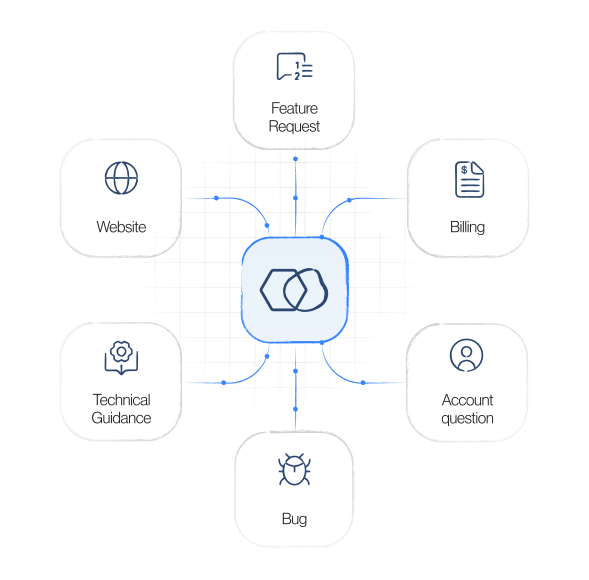
Inkeep is purpose-built for technical companies that need AI support beyond basic chatbots. Where Chatbase offers a standalone bot, Inkeep provides a full platform: multi-agent orchestration, native help desk integration, citations on every response, and zero context loss at escalation.
Why teams switch from Chatbase: Full conversation history travels with every escalated ticket. Agents never start from zero. The AI works inside Zendesk and Intercom, not in a separate tab.
Best for: B2B SaaS companies, developer-facing products, and any team where broken handoffs directly impact customer retention. See how this works for B2B customer support.
2. Intercom Fin — best for existing Intercom customers
Fin is Intercom's native AI Agent. It works seamlessly within the Intercom ecosystem, handling resolution and escalation in the same platform agents already use.
Strengths: Deep Intercom integration, conversation continuity within Intercom, decent resolution rates for straightforward queries.
Limitations: Locked to the Intercom ecosystem. If your team uses Zendesk, Salesforce, or multiple help desks, Fin doesn't extend. Limited multi-agent capabilities compared to dedicated orchestration platforms.
For a detailed breakdown, see our Inkeep vs Intercom Fin comparison.
3. Kapa.ai — best for developer documentation chatbots
Kapa.ai focuses on turning technical documentation into AI-powered answers. Strong at ingesting docs, API references, and code examples.
Strengths: Good at technical documentation Q&A. Developer-focused UI.
Limitations: Narrower scope than full support platforms. Less mature escalation workflows and help desk integrations. Limited analytics on conversation patterns.
4. Zendesk AI — best for existing Zendesk customers
Zendesk's built-in AI features offer ticket classification, suggested responses, and basic automation within the Zendesk ecosystem.
Strengths: Native Zendesk integration. No additional vendor to manage.
Limitations: AI capabilities are add-ons to a legacy platform, not built AI-native. Limited multi-agent reasoning. Basic RAG compared to dedicated AI support platforms.
5. Chatbase — when it's still the right choice
Chatbase isn't wrong for everyone. It's a solid choice for small teams that need a quick-deploy chatbot trained on their content, without complex escalation requirements.
Where Chatbase works well: Marketing sites, simple FAQ bots, early-stage products with low support volume, teams that don't use a dedicated help desk yet.
Where it falls short: Any scenario requiring help desk integration, conversation continuity at handoff, per-response citations, or multi-agent coordination.
How to migrate from Chatbase
If you've outgrown Chatbase, the migration path depends on your help desk:
- Audit your escalation paths. Count tickets where agents had to re-ask what the bot already covered. This is your cost baseline.
- Map your knowledge sources. Chatbase pulls from uploaded files. Enterprise alternatives can ingest docs sites, help centers, Notion, Confluence — automatically and continuously.
- Run a parallel pilot. Deploy the new platform on a subset of channels alongside Chatbase. Compare resolution time, customer satisfaction, and agent time-to-context.
- Migrate gradually. Switch channels one at a time. Start with the channel that has the most escalation failures.
How Inkeep approaches enterprise support integration
The architectural requirements outlined above aren't hypothetical—they're the design principles behind Inkeep's approach to enterprise support workflows.
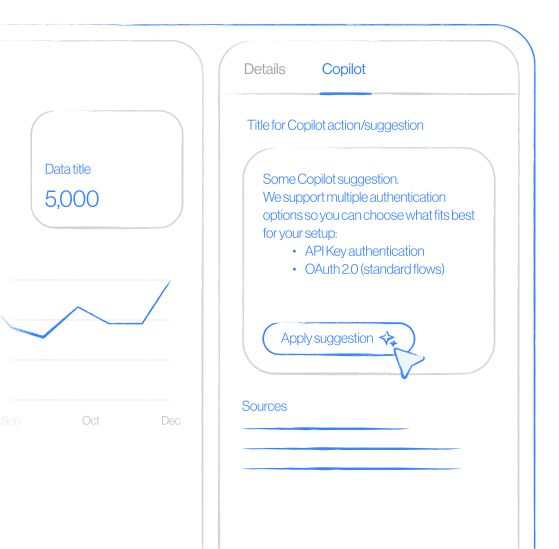
Native agent workspace integration. The Zendesk co-pilot places AI-suggested answers directly in the agent workspace, pulling from your existing knowledge base. When a ticket arrives—whether escalated from the chatbot or submitted directly—agents see relevant documentation and suggested responses without opening another tab. No context switching, no hunting through separate dashboards. The AI works where your team already works.
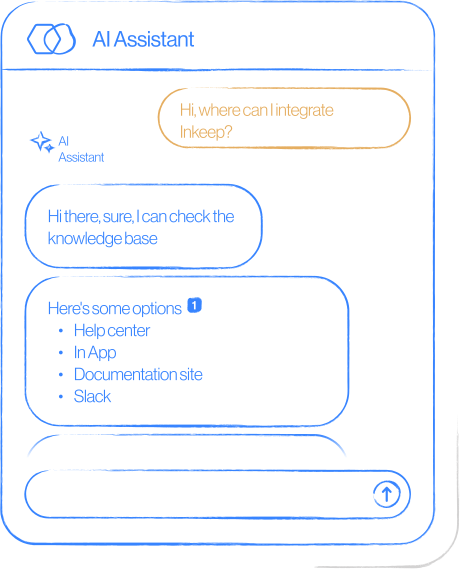
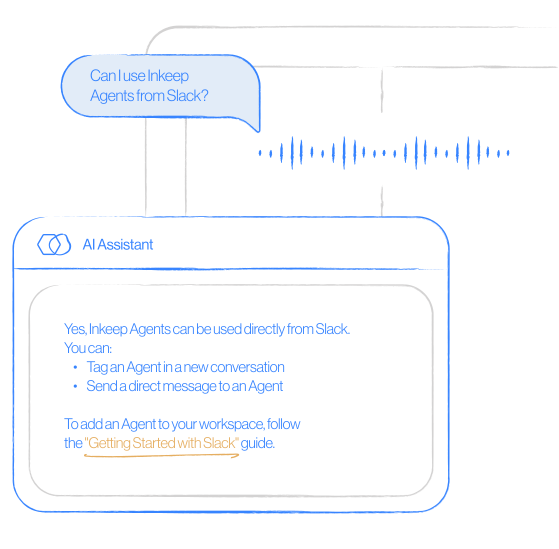
Citations on every response. Inkeep's proprietary RAG engine cites every answer from your knowledge base, creating a verifiable trail that serves both agents and customers. Agents can confirm accuracy with a single click rather than searching documentation to validate what the bot told a customer. Customers see exactly where information comes from, building trust in AI-generated responses. This stands in contrast to tools that provide answers without verifiable sources—a critical distinction for technical companies where accuracy isn't optional.
Documentation gap analysis. Support conversations reveal where your docs fall short. Inkeep surfaces these gaps systematically: questions the AI couldn't answer confidently, topics where customers consistently need human intervention, areas where existing documentation creates confusion rather than clarity. This transforms support data into actionable documentation improvements, closing the loop between customer questions and content strategy.
Flexibility across technical and operational teams. The low-code visual studio lets support ops configure workflows without engineering involvement. The TypeScript SDK gives developers full customization control when they need it. Changes sync bidirectionally, so neither team blocks the other. Enterprise workflows require this dual-track approach—ops teams need speed, engineering teams need depth.
Purpose-built for technical companies. Inkeep powers support for organizations where hallucinated answers damage credibility and broken handoffs derail complex technical troubleshooting. The architecture reflects this reality: precision matters more than deflection counts.
The goal isn't to replace your support team—it's to make escalation seamless and AI assistance trustworthy.
Making the Transition: From Deflection-First to Workflow-First
Shifting your AI support strategy from deflection metrics to workflow integration doesn't require a complete overhaul—it requires asking better questions and measuring what actually matters.
Start with an escalation audit. Count the clicks: how many steps does it take for an agent to see what your bot already told a frustrated customer? If the answer involves switching tools, opening separate dashboards, or asking the customer to repeat themselves, you've identified your first bottleneck. The goal is zero context loss at the handoff boundary.
Expand your measurement framework. Deflection rate tells you how many conversations the bot contained—it says a leader what happened when containment failed. Track escalation resolution time, customer satisfaction specifically on escalated tickets, and agent time-to-context. These metrics reveal whether your AI is helping your team or just hiding problems until they explode.
Make evaluation cross-functional. Enterprise workflow decisions fail when support ops evaluates alone and engineering inherits implementation headaches—or vice versa. As Freshworks research notes, enhancing employee experience remains a pivotal focus for IT leaders. Your agents and your developers both need to validate that the solution works in their reality.
Treat cost as a feature. Teams consistently raise concerns about solutions costing $10,000 or more monthly at scale. Look for transparent pricing that scales predictably—surprise costs erode ROI faster than any efficiency gain.
Reframe the AI's role. Here's the insight most teams miss: analysis of churning customers shows that 14% cite "lack of features"—but deeper investigation reveals they actually lacked understanding of existing features. Your AI assistant isn't just a ticket deflector; it's a product educator. When it helps customers understand what your product can already do, you're preventing churn at the source.
If these workflow challenges resonate with what your team is facing, see how Inkeep's agent visibility works in Zendesk and Intercom—watch context travel seamlessly from bot to agent. Prefer to evaluate independently? Explore our enterprise integration documentation first.
The future of AI support isn't bots that keep customers away from agents—it's systems where both work together, and no context ever gets lost in between.
Frequently Asked Questions
For enterprise support teams, Inkeep offers native help desk integration (Zendesk, Intercom), full conversation continuity at escalation, and citations on every response — capabilities Chatbase lacks. Other alternatives include Intercom Fin for existing Intercom users and Kapa.ai for developer documentation.
Chatbase is a strong choice for small teams that need a quick-deploy chatbot with basic RAG. It falls short for enterprise workflows because it lacks native help desk integration, conversation continuity at escalation, and per-response citations.
Chatbase starts at $19/month for basic plans. Enterprise alternatives like Inkeep use custom pricing based on volume and integrations. The real cost comparison should include agent time wasted on broken handoffs — teams report 45% faster resolution with proper integration.
The most revealing question: can agents see the full AI conversation when tickets escalate? If the answer involves a separate dashboard or exported logs, that's a red flag for enterprise workflows.
Agents verify accuracy instantly; customers see sources and build trust. Without citations, every AI response requires manual verification — adding minutes to every ticket.